Local AI on NVIDIA and AMD, without CUDA.
A development record.
A complete local AI runtime: chat, pictures, speech, document search and GPU compute from one engine, written from scratch. It runs through Vulkan, with no CUDA, ROCm or llama.cpp underneath.
Size of the September 26 development package, with Python and without models.
Ollama, ComfyUI and the CUDA speech libraries come to about 4.3 GB together.
One engine, one build. Vulkan, not CUDA or ROCm.
Development builds were tested on an RTX 5080 and a laptop Radeon 780M.
Not a llama.cpp wrapper. About 200 GPU kernels written for it, from model loading to tensor-core prompt reading.
Qwen, Llama, Mistral, Phi, Gemma, Granite, SmolLM, DeepSeek and more, from 0.5B to 30B.
Personal, education, nonprofit, workplace and local developer use. Final public terms await approval.
Putting it inside something you sell needs a commercial licence.
Measured and written up by its developer. Page updated 14 November 2026.
What it does
One engine, nine jobs.
These development workflows share the runtime. The current Suite application supplies the browser UI, document ingestion and HTTP server; available features depend on the installed models.
Chat
Models from 0.5B to 30B, including mixture-of-experts. Answers on your machine, offline.
Document search
Suite indexes supported documents and can provide source references. Documents is in preview; check answers against the source.
Embeddings
Turn text into search vectors for your own retrieval, locally and for free.
Vision
Image understanding, so a model can answer questions about a picture you give it.
Picture generation
SD 1.5 and SDXL, made by your own graphics card.
Speech to text
Whisper, from dictation to long recordings. A minute of audio in about three seconds.
Reading aloud
Natural voices, faster than the audio plays. English.
GPU compute for games
Particles, flocking, bouncing debris, balloon deformation, lighting and scenery rendering on the local GPU.
A local API
Suite supplies OpenAI-compatible endpoints for supported requests. Use its connection settings and installed model IDs.
In games
What VulRunWG computes during play.
In The Far Off Up, the game supplies the rules and painted artwork. VulRunWG runs its graphics and visual simulation calculations locally on the GPU, through the same engine used for its AI models.
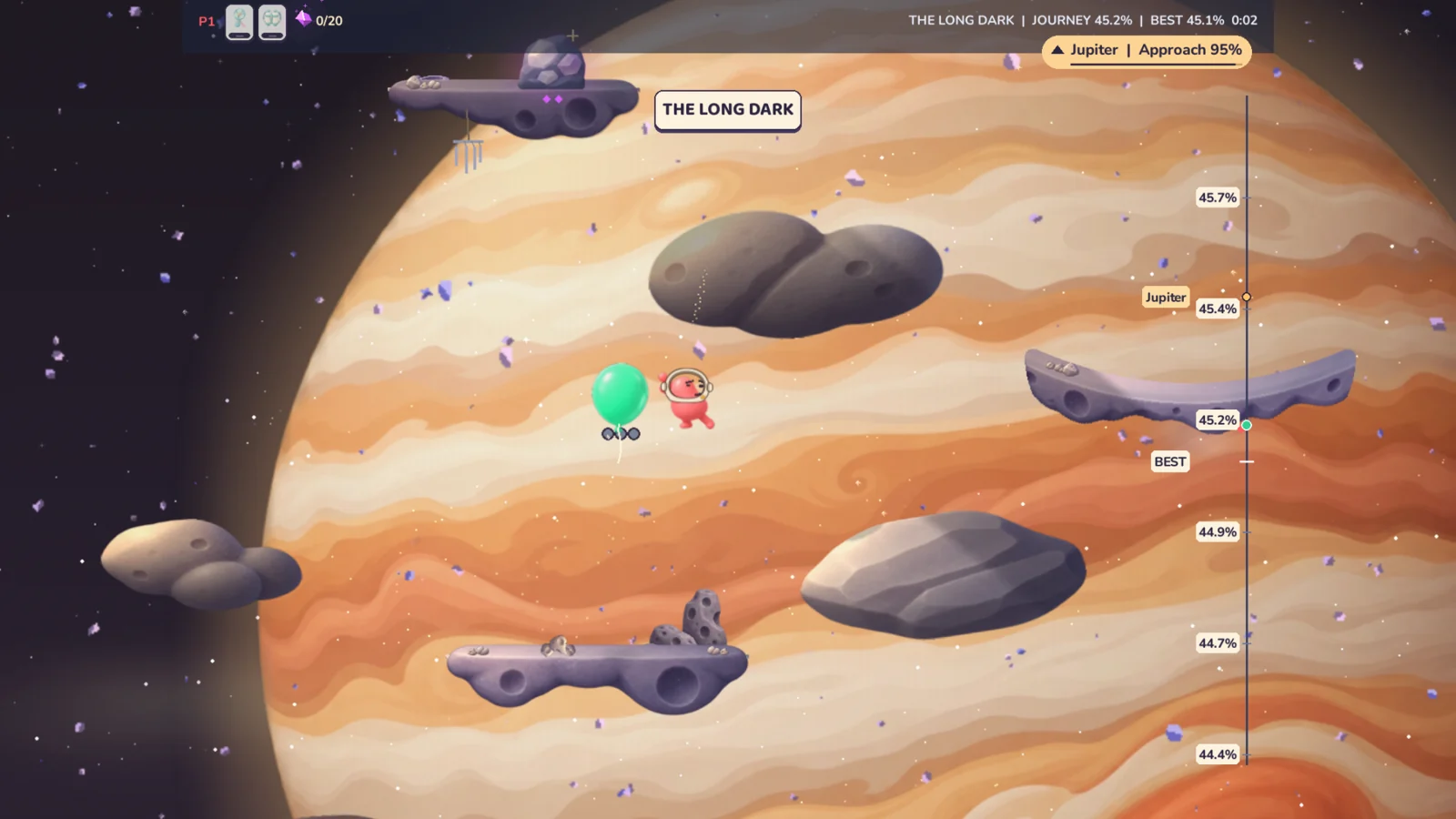
- Particles and flocks
- Updates drifting dust, rain, sparks and flock movement, including how nearby characters and the balloon disturb the particles.
- Debris and balloon shape
- Calculates tumbling fragments and their bounces against ledges. Springs and internal pressure make Volly dent, wobble and settle after a hit.
- Lighting
- Calculates local light and occlusion from scene sources and effects, then combines the result with the painted world.
- Scenery and camera
- Scales and fades painted planets and terrain, and projects the scene for the camera and widescreen view.
Speed
Fast where it counts.
Same card, same model file as llama.cpp: text generation within 6% of it, prompt reading within 1.7×. Qwen3 4B reads a 4,200-token document, about 3,000 words, in 1.3 s.
Full tables, with the method behind each figure, are further down and in the measurement notes.
Size and setup
The earlier development package.
The September 26 development archive included Python and used a compatible Vulkan graphics driver. These recorded sizes exclude models and do not describe an approved current release.
| Download size, models not included | measured |
|---|---|
| VulRunWG: chat, pictures, speech to text, read-aloud | about 38 MB |
| Ollama 0.34.4 for Windows: chat | 1,571 MB |
| ComfyUI portable 0.37.0 for NVIDIA: pictures | 1,925 MB |
| CUDA libraries for faster-whisper: speech to text | 849 MB |
| Those three together | about 4.3 GB |
None of these includes a model. The CUDA-based ones each bring their own copy of NVIDIA’s libraries. They are full programs with their own features; this compares download size only.
Hardware
From a laptop with no graphics card upwards.
Chat, speech, document search and SD 1.5 pictures all run. A 1.5B model chats at about 30 tokens/s, and a 728-token prompt reads in about 2.2 seconds.
Chat up to 7B, speech, SD 1.5 and SDXL pictures. A 7B model holds about 4,500 tokens of conversation; smaller models hold more. A 1,000-token prompt on a 7B model reads in 1.0 s.
Chat and pictures, including SDXL-based models.
14B models, a 30B mixture-of-experts model, and every speed figure on this page.
Who it is for
Where it fits.
At home
Useful without a subscription or an account.
- Ask questions about your own documents and letters
- Dictate notes and have them read back
- Make pictures without paying per image
Schools, clinics and nonprofits
Local inference, subject to your organisation’s approved deployment and data-handling practices.
- Choose which files the application may use
- Local model workflows can run offline once set up
- Downloads and optional network tools need separate review
- Compatible integrated graphics have been tested
For developers
A local API your existing code already knows how to talk to.
- OpenAI-compatible chat, embeddings, speech and pictures
- Python, JavaScript and C# clients included
- Runs as a helper process inside your own program
- One start-up setting serves several users or apps at once
For game developers
One runtime for the model and the graphics work.
- Run your own graphics and simulation shaders on its GPU device
- Use particles, lighting and visual physics alongside local models
- Game effects already run in The Far Off Up and Rules for Thee
For organisations handling sensitive information. Local inference does not establish compliance by itself. Review the application’s storage, optional network functions and deployment settings under your organisation’s policies.
For developers
Point your OpenAI code at it.
Suite supplies a local HTTP server with supported OpenAI-compatible requests. Copy its local API URL, API key and an installed model ID into this example; not every cloud option is implemented.
from openai import OpenAI

client = OpenAI(
    base_url="<local API URL from Suite>",
    api_key="<API key from Suite>",
)

reply = client.chat.completions.create(
    model="<installed model ID from Suite>",
    messages=[{"role": "user",
               "content": "Name three rivers in Europe."}],
)
print(reply.choices[0].message.content)
Clients included
Python, JavaScript and C#, each able to start the runtime as a child process of your own program and shut it down with it.
No silent substitutions
A setting this build accepts but does not apply is named in the reply. A model or voice it cannot provide is refused by name, never swapped for another.
Handles several at once
Started with the shared setting, up to eight users or apps use the card together: about 350 tokens/s in total on a 7B model, each answer starting in about 0.3 s. Creative, tool and long-document requests join like any other, and the health check reports which setting is on.
How it’s built
Under the hood.
- Its own GPU engine, written from scratch: WGSL shaders on wgpu, over Vulkan. No CUDA, no ROCm, no PyTorch, no llama.cpp.
- On NVIDIA, prompts are read on the tensor cores in int8, with hand-written cooperative-matrix kernels.
- The early runtime depended on wgpu, numpy, gguf, jinja2 and regex. Current runtime and application dependencies are tracked separately; this is not the current distribution inventory.
- The early engine archive, including its GPU kernels and surrounding code, was about 9 MB.
- The historical 38 MB package included its Python environment. The same GPU infrastructure can serve dedicated model and effect kernels.
- Answers are checked against exact arithmetic and against llama.cpp, model by model.
- Some model paths attempt recovery after a device failure. Automatic recovery across all workloads is not verified.
- Inference runs locally. Requested downloads and optional network tools can connect externally; see the current application description for its scope.
Checkable
Its own engine, and how we know.
“Written from scratch” is a claim anyone can make. These are the tests behind it.
The trap test
The independence test makes llama.cpp raise if invoked, then runs the tested generation path without triggering it. This demonstrates implementation independence, not factual answer accuracy.
The import audit
A check walks everything the running engine loads and must find no PyTorch, ONNX Runtime or llama.cpp. They appear only in the test tools, as answer keys.
The conformance gate
Recorded conformance runs compare tokenizer behavior, logits and generation with publisher tokenizers, float64 reference math and llama.cpp. These are bounded numerical tests, not proof that answers are factually correct or certification of a later build.
| Family | Historical conformance files |
|---|---|
| Qwen 2.5 | 0.5B, 1.5B, 7B, 14B |
| Qwen 3 | 4B, 8B |
| Llama 3.x | 3.2 1B, 3.1 8B |
| Mistral | 7B Instruct v0.3 |
| Phi | Phi-3 mini, Phi-3.5 mini |
| Gemma | Gemma 2 2B, Gemma 3 1B and 4B |
| SmolLM2 | 1.7B |
The September ledger records 15 Q4_K_M model files from seven families tested on an RTX 5080. This is historical conformance coverage, not a certification of every model or the current build. Individual runs and exceptions belong with the original ledger.
Measurements
Every number, model by model.
Chat and prompt speed model by model, speech-to-text error rates, picture times, expert models, and perplexity against llama.cpp. Plus what it runs, what you need and which operating systems were tested.
Measurements and specificationsLimits
What it doesn’t do.
- Reading a long prompt is about 1.7× slower than llama.cpp (728 tokens: 195 ms against 114 ms). Generating is level with it.
- Tensor-core prompt reading needs an NVIDIA card whose driver offers it; other graphics read prompts the slower way.
- AMD Radeon graphics cards (RX series) are not measured yet; only the Radeon 780M built into a laptop processor is.
- Linux is measured on one laptop only. Other Linux systems, and AMD’s own Linux driver, are not tested.
- Built-in graphics is much slower than a card: a 512-pixel picture takes about 80 s on a Radeon 780M against 8 s on an RTX 5080.
- A model too big for your card or PC memory is refused with a message. Other programs using the card can still make a job fail.
- The speech accuracy results shown here use English recordings. Other languages depend on the selected model and are not validated by those results.
- Small models can be wrong. Answers from your documents name their source; check anything that matters before acting on it.
- Models are not included, and each keeps its publisher’s licence.
- Not public yet.
Built on it
What already uses it.
Worksheets, visual supports and clinical drafts for teachers and therapists.
An editable worksheet canvas with uploaded images, reusable stickers and local background removal.
Particles, flocking, debris, balloon deformation, lighting and scenery rendering on the shared GPU engine.
Dust, stamp and verdict effects in the game builds, on by default.
Technical write-up
Want the detail?
Interface, supported models, memory controls and measurement methods. Free on request.
Measurement notes: dates, settings and methods